


Welcome back to the Taskize quarterly roundup of product updates. As of this quarter, users and admins can filter Bubbles in new ways, and read a Bubble’s details and its conversation side by side. Counterparties also get clearer email outputs from the Taskize platform, and we’ve introduced personal management of webhook subscriptions.

1. FIND THE BUBBLES THAT NEED YOU WITH NEW FILTERS
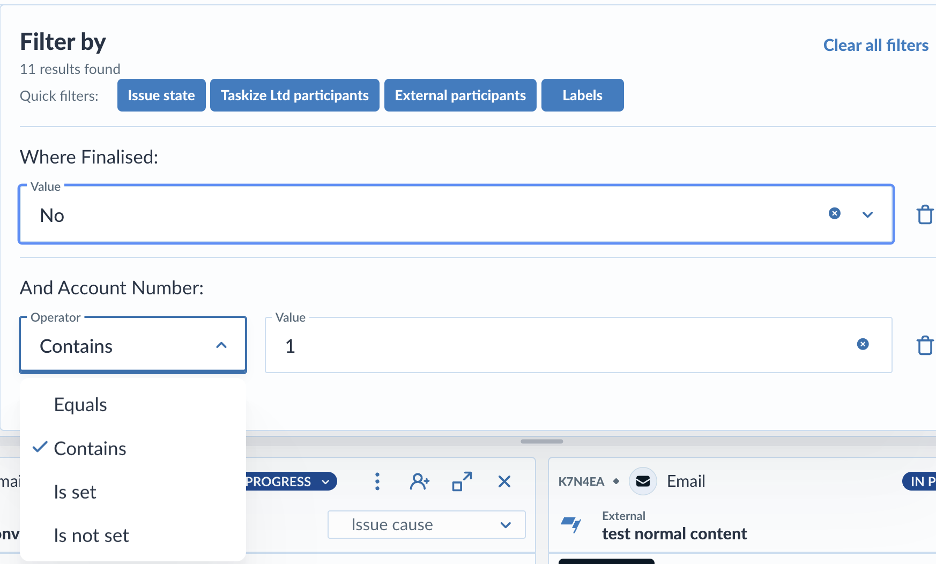
You can now filter your Bubbles on what's missing, not only on what's there. Try these new options in the Filter panel:
- Set an attribute to Is not set to find every Bubble with no value recorded, for example, no issue cause.
- Filter a number or date within a range with Between.
- Select Is one of to choose several values at once.
- Use the new Has attachment criterion to find Bubbles with files.
- Use Scope to separate internal work from external.
In the Investigation view, you can also click a column header to sort.
Client Help Centre > Documentation > Choose a filter operator
2. Read the conversation and the bubble details side by side
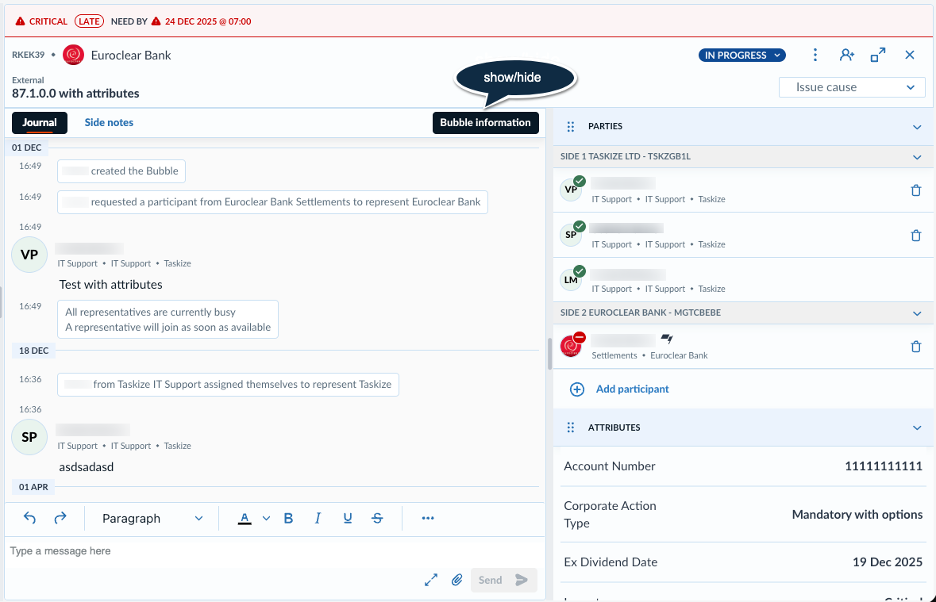
The Bubble information panel now opens beside the journal instead of over it, so you can check parties, attributes, and attachments while you read. Drag the panel to the width you want, and Taskize keeps that width for every Bubble.
To show or hide the panel, click Bubble information in the tab bar. On narrow cards, such as in the Investigation view, the panel opens as an overlay.
Client Help Centre > Documentation > Bubble information panel
3. ACT ON A BUBBLE IN FEWER CLICKS
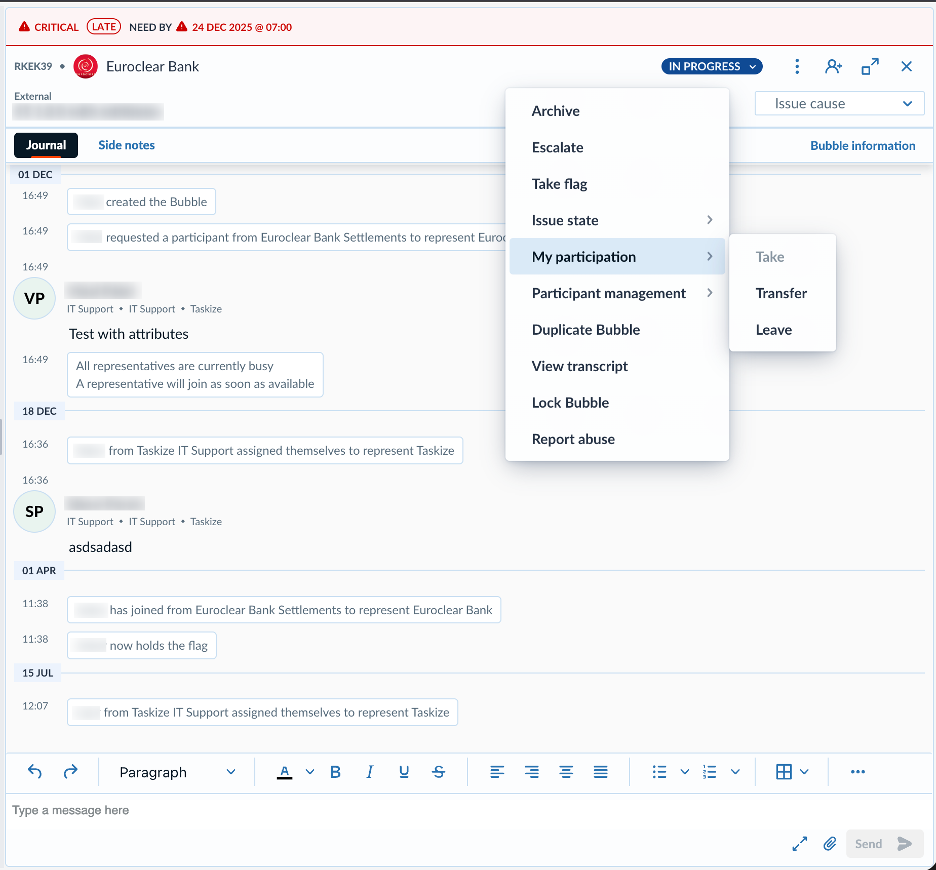
The Bubble action menu now shows only the actions that apply to the Bubble you opened it from. Related actions sit in short sub-menus that stay inside the window. You can also:
- Change a Bubble's status from the status dropdown in the Bubble card header, without opening the menu.
- Cancel unassigned participation requests on several Bubbles at once in the Investigation view.
Client Help Centre > Documentation > Bubble actions
4. WORK AS EQUALS ON YOUR SIDE OF A BUBBLE
Every participant on a side now has the same privileges, so no one needs to take the lead before work can move. Anyone can remove participants from their own side, and participants on the side that raised the Bubble can remove any participant. Responsibilities that belonged to the lead participant now sit with the lead organisation.
Client Help Centre > Documentation > Remove a participant from a Bubble
5. LABEL SEVERAL BUBBLES AT ONCE
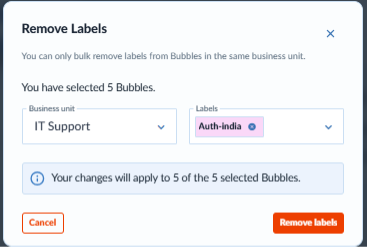
If your organisation uses labels, then you can now add or remove them on up to 20 Bubbles in one action.
Labels are initially available to selected clients. If you would like them enabled, then contact your customer success representative.
Client Help Centre > Documentation > Add or remove labels on several Bubbles
6. SEND CLEARER EMAILS TO YOUR COUNTERPARTIES
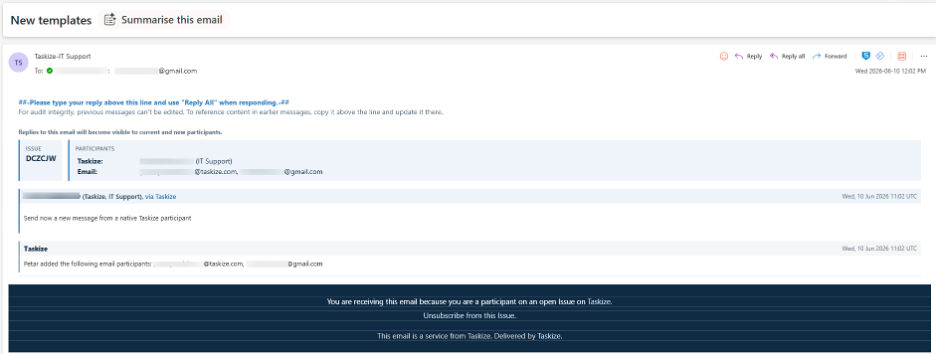
Emails that Taskize sends to your email participants have a new look. An information panel at the top shows the Bubble identifier and participants. Each message sits in its own colour-coded card, so your counterparties can see who said what at a glance.
When a counterparty replies, Taskize now recognises the reply marker even if their email application changes its formatting. Only their new message goes into the journal, so the email trail no longer repeats.
Client Help Centre > Documentation > Contents of emails sent by Taskize
7. CHECK A TRADE'S STATUS WITHOUT RAISING A BUBBLE
The trade status workflow is now available to more clients. Select the workflow from the New Bubble list, enter the trade ID, and Taskize checks the status with your counterparty's system. If you still have a question, then create a Bubble with the trade details already filled in.
To discuss this workflow for your organisation, contact your customer success representative.
Client Help Centre > Documentation > Query a third-party system
8. MANAGE YOUR OWN WEBHOOK SUBSCRIPTIONS
If you integrate with Taskize through the Async API, then you can now manage your own webhook subscriptions. List, create, update, disable, and delete them, and send a test event to check your endpoint.
A new Push API Admin permission controls who can manage subscriptions, and each delivery URL must be on your organisation's list of approved domains. To get started, contact Taskize.
Client Help Centre > Documentation > Manage webhook subscriptions
Have questions or feedback? Contact your customer success representative, reach out to Taskize Support, or explore the full Taskize documentation for step-by-step guides.
No Comments Yet
Let us know what you think