


Welcome to the first edition of our quarterly product news roundup. Since the beginning of the year, we shipped updates to the email connector setup, Smart Directory routing, and real-time API sync.
Here's an at-a-glance guide to seven of our most important updates, with links for clients through to more information on our support site. If you're not a client and would like access to the links and a deeper level of info, please get in touch.
.jpg?width=2500&height=1667&name=Taskize_March26_SJ_Candidteam-27%20(1).jpg)
1. Spot critical Bubbles instantly

Your team can now spot critical Taskize Bubbles instantly. Colour-coded banners at the top of each Bubble card highlight locked status, escalation, importance level, and approaching or overdue Need By dates. Red banners flag overdue items and Critical importance, and yellow banners signal items that need attention soon.
Client Help Centre > Documentation > Release notes
2. Configure Microsoft 365 email connectors easily
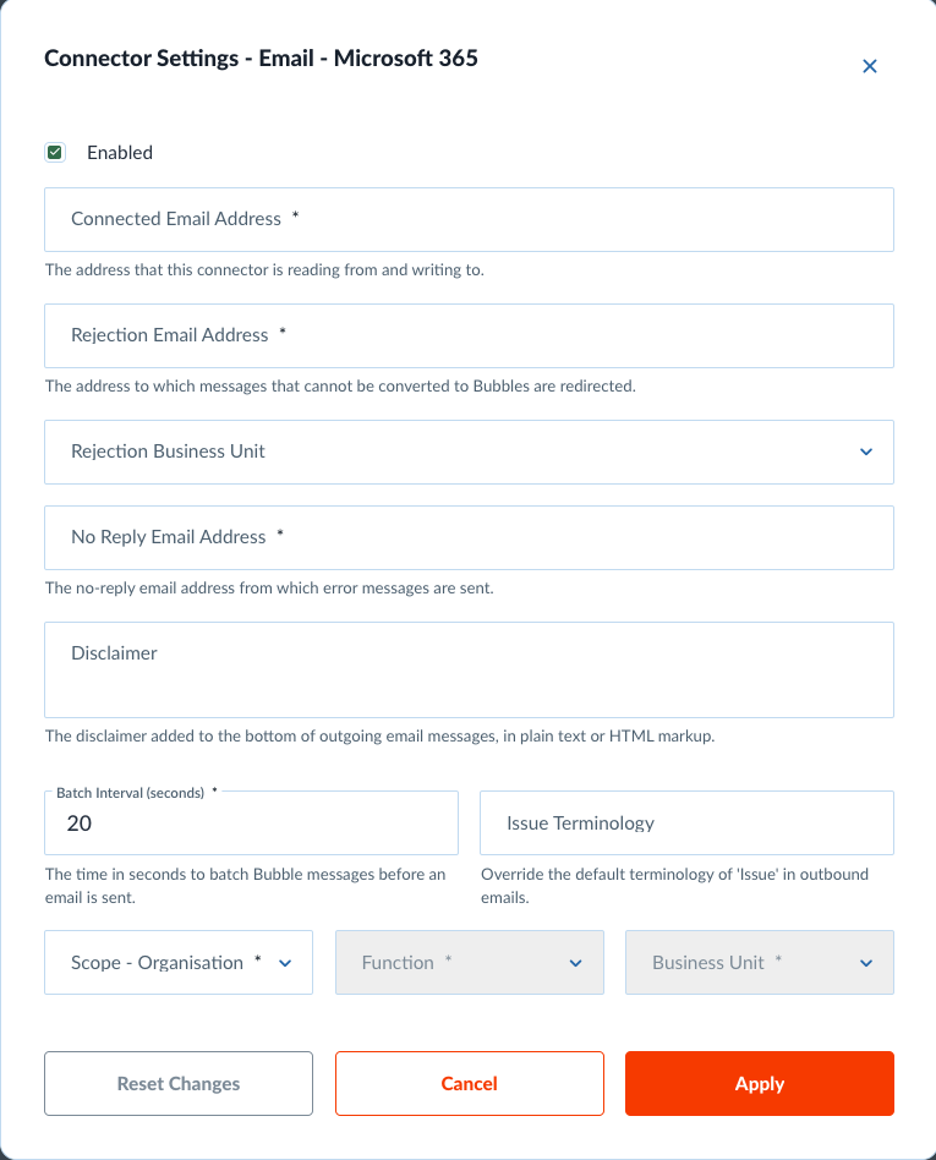
Administrators can now set up Microsoft 365 email connectors through a dedicated configuration page. The new interface separates M365 settings from AWS connectors, so there's less confusion and decreased potential for configuration errors.
Client Help Centre > Documentation > M365 email connector configuration
3. Route Bubbles to available team members automatically
Your integrated systems can now tell the Taskize platform who's online, so Bubbles get routed to available people. When your systems report which users are currently active, Taskize’s Smart Directory assigns work only to team members who are ready to respond. Fewer reassignments means faster resolution.
Client Help Centre > Documentation > User status API
4. Pre-select organisations using Legal Entity Identifiers
You can now pass Legal Entity Identifier (LEI) values from your upstream systems when creating Bubbles. Taskize matches the LEI to known organisations and pre-fills the participant selection, so users don't have to search and select manually.
Client Help Centre > Documentation > Release notes
5. Route work based on whether attributes are set
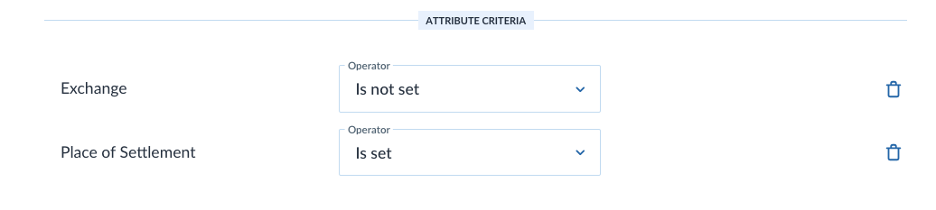
Smart Directory routing rules can now check whether a menu attribute has a value or not. Administrators can route Bubbles based on whether key information is present, not just what value it has.
Client Help Centre > Documentation > Release notes
6. Get instant updates when participants join or leave
Your systems can now receive instant updates when participants join or leave a Bubble, and when participation requests are created or fulfilled. So this means no more polling for changes or working with stale participant data.
Client Help Centre > Documentation > Push API events
7. Match users across systems with external identifiers
Taskize now includes your organisation's own user identifiers in API responses. When your systems retrieve user information, they receive the external ID you've assigned to each user. This makes it simpler to match Taskize activity against your own internal records.
Client Help Centre > Documentation > User data
We'd love to hear how you're using these new features. Contact your Taskize representative, reach out to our support team, or explore the full Taskize documentation for step-by-step guides.
Taskize Platform Updates — What's New in Q2 2026?
3 Key Takeaways from SIFMA Ops 2026

No Comments Yet
Let us know what you think